Proof logs
Before implementing F0002-move-a-piece, we add proof logs to the
start-a-game flow — traceable lines that tie every step back to a single request.
Each run gets a session id and a tracking number. The tracking number is a fresh random
integer (10 000–99 999) that correlates the lines of one run. The
session id is a hard-coded "1234" for now — there's no session or player concept yet, so we
pin it to a placeholder instead of blocking on a design we don't need today.
"1234" becomes a
genuine per-session id — and the proof logs already carry it, so they'll tell games apart for free.
The logging isn't ad-hoc: it's generated from a proof-logs.md spec that defines the
proof of execution — evidence that each feature actually ran, in order, for a given request. The
main ideas:
- Every feature logs its start and end (
requested→served), so a missing bookend means a step never completed. - Each line carries a follower tag —
[[session][tracking][FEATURE]]— that stitches all lines of one request into a single traceable thread. - The closing line records a result (
SUCCESS), turning the log into proof, not just commentary.
/implement-proof-logs  START-A-GAME

For the session id, use a "1234" constant for now, and the tracking
number will be a random integer between 10'000 and 99'999start-a-game path — a foundation to lean on as we start building the move feature on top.
![fisher-server proof logs for two start-a-game calls, each tagged with a follower of the form [[1234][tracking-number][START-A-GAME]]](shots/proof-logs.jpg)
start-a-game calls, each line tagged with
follower=[[1234][86419][START-A-GAME]] — the constant 1234 session id, the
random tracking number (86419, then 15632), and the feature id. Every step
from start-game requested to start-game served carries the same tag, so a whole
run reads back as one thread.Specifying move-a-piece
With the proof logs in place, we write the F0002 spec before any code —
the AI SDD way. The spec pins down the whole round trip: the human picks two squares, the front end sends
the move, and the fisher-server rules on whether it is legal.
For now the player always has White. The interaction is two clicks:
- First click —
square1(e.g.D2). The front end checks it locally: the square must not be empty and must hold a white piece. Clicking the same square again cancels the selection. - Second click —
square2(e.g.D4). As soon as it is picked, the front end sends/move-a-pieceto thefisher-serverwith the moveD2 D4.
The server is the referee. It replies valid or illegal after checking that
square1 holds a white piece, that the move shape matches the piece type, and that the path is not
blocked. It also reports whether square2 held a black piece — a capture. On a valid move
it updates the stored positions for the game uuid and records the captured piece.
Once the API answers, the front end reacts: on valid it slides the piece across, removes the
captured piece if the API flagged a take, and keeps both squares highlighted. On illegal it
shows a message and clears the selection.
/guide-spec-definition-md F0002 move a piece

We assume the user plays White (fixed for now).

Front end
* The user selects a square on the board; its name is stored
  locally as square1 (e.g. D2).
* square1 must not be empty (checked on the front end).
* square1 must hold a white piece.
* Selecting the same square again cancels the selection.
* The user then selects a second square, stored locally as
  square2 (e.g. D4).
* As soon as square2 is selected, the front end sends the
  /move-a-piece request to the fisher-server.

Back end
* The server receives the move (e.g. D2 D4).
* It checks whether the move is legal:
   * square1 holds a white piece.
   * The move shape matches the piece type (a pawn move, a
     rook move, and so on).
   * The path is not blocked by other pieces.
   * The king is not left in check after the move
     (deferred — out of scope).
* It also determines:
   * Whether square2 holds a black piece (a capture).
   * Whether a pawn from square1 reaches rank 8 (checked but
     postponed — out of scope).

The server returns "valid" or "illegal" for the move. If the
move is valid, it updates the stored piece positions for the
game uuid and records the captured pieces.

Once the API responds, the front end:
* If the move is valid, visually moves the piece from one
  square to the other.
   * If it is a capture (as reported by the API), removes the
     target piece from the board.
   * Keeps both squares highlighted.
* If the move is invalid, shows a message on the page and
  cancels the square selection.
Which squares can a piece actually reach?
The first draft answered "is this move legal?" one move at a time. But the same question, asked the other way round — "which squares can this piece reach right now?" — is far more useful. A second prompt folds that in as its own section of the spec.
Take the pawn as the worked example. It only ever moves forward, and its reach depends on the board around it:
| Pawn move | When it's allowed |
|---|---|
| One step forward | Target square is empty |
| Two steps forward | Pawn is still on its starting rank and both squares ahead are empty |
| One step diagonally forward | Only to capture — the target holds an opposing piece |
One rule sits above every piece: the destination must fall inside the a1..h8 matrix. That,
plus the per-piece shape and a blocked-path check, is enough to enumerate every legal square.
So the spec names a routine — (piece_to_move, board) → list of reachable squares
— where each reachable square is either (position, empty) or
(position, capturable_piece). Validating a single move becomes "is square2 in that
list?", and — the real payoff — asking the same routine about the enemy pieces tells us whether a
king is in check.
/guide-spec-definition-md F0002 Add a section that clearly explains
which squares are legally reachable for a piece.

For example: a pawn can only move one step forward (two steps if it is
still on its starting rank). It can move one step diagonally forward
only to capture. The pawn's target square must not be blocked by
another piece.

Common rule: the destination must lie within the a1..h8 matrix.

This will support a routine (piece_to_move, board) -> list of reachable
squares, where a reachable square is either (position, empty) or
(position, capturable_piece).

With this in place, deciding whether a king is in check becomes
straightforward.
Don't repeat the rules — reference them
The move-validity rule (B4) had started to restate the pawn's movement grid inline — a second
copy of logic the reachable-squares routine already owns. That's exactly the kind of duplication a spec should
avoid, so a third prompt points it back at the single source of truth: a move is legal when its target is in
the list of accessible squares. One rule, one place.
/guide-spec-definition-md F0002 For rule B4, please just reference the
accessible_squares routine instead of showing another complicated grid.
We can say the selected move must comply with the list of accessible
squares.
Bringing king-in-check back into the loop
King-in-check was deferred earlier — but the reachable-squares routine makes it cheap enough to pull back in. The question flips into something the spec can already answer: "is White's king in check?" becomes "is the king's square the target of any black piece's accessible squares?" Run the routine over every black piece, collect the squares they attack, and check whether the white king stands on one of them.
With that, a move that leaves your own king in check becomes a new reason for the server to return
illegal — the last validity check to join the loop.
/guide-spec-definition-md F0002 Now I want to bring king-in-check
validation into the loop. As the spec already describes, "is White's
king in check?" becomes "is the king's square the target of any black
piece's accessible squares?" So include it in the validation process
as a cause of an invalid move.
Let the board redraw itself
One last simplification, this time on the front end. The first draft had the browser do the visual work of a
move by hand — slide the piece across, delete the captured piece, re-highlight. But the /move-a-piece
API already returns the complete board after a valid move. So the front end doesn't need to reconstruct
anything: it just redraws the board it receives. A smarter version repaints only the squares whose content
actually changed.
/guide-spec-definition-md F0002 Actually, to make the front-end job
easier — and because the /move-a-piece API returns the complete board —
the front end simply redraws the current board from the new "board" it
receives. If we make it smart, it only redraws the squares whose content
has changed (smart redraw).
A back door for the tests
To write meaningful integration tests, we need to start each one from a known position — not from the
opening setup every time. So the spec adds a second, private API: /setup-board. You hand it a
board description, it overwrites the current game with that setup, and it echoes the same board back. It's a
test-only door: it exists so a test can begin from an exact, controlled arrangement of pieces.
/guide-spec-definition-md F0002 We also need another private API so we
can write meaningful integration tests. This API will be /setup-board,
and it takes a board description. It overrides the current game with
that board setup and, in return, simply sends the same board back. Note
that this API is for integration testing only, so that tests can start
from a known piece setup.F0002.md specification and the rules it must enforce. The reachable-squares routine gives the
later unit tests a single, named target to verify.The spec, on GitHub
The finished specification lives beside the code in the feat/F0002-move-a-piece branch —
generated the AI SDD way and readable in full.
Testing move-a-piece before the code
With the F0002 spec settled, the tests come next — still before any
implementation. The spec is now a target the Rust integration tests can pin down, so a passing suite later
becomes the proof that the generated code does what the spec promised.
The first prompt just points the test guide at F0002 and lets it scaffold the integration-test
spec from the rules already written.
/guide-integration-test-rust-md F0002Then we ask for concrete cases. The /setup-board back door from Part 2 pays off here: each test
can begin from a real, known position instead of the opening setup, then play one legal move per piece type and
assert the server accepts it.
/guide-integration-test-rust-md F0002
* For the /move-a-piece API, add a few integration tests for valid
  moves — for the knight (N), king (K), queen (Q), rook (R), and
  bishop (B).
* For those new tests, start from a historical middle-game board
  position you can find online.
The test specs, on GitHub
Both test specs — written before a line of implementation — live beside the code in the
feat/F0002-move-a-piece branch.
Building move-a-piece, end to end
Spec and tests in hand, we let the AI implement the feature — front end and back end together — and then walk the whole round trip: proof logs, a spec cross-check, a UI fix for the missing highlight, a test-drift check, and one small spec-first addition. AI implements, humans decide.
Implement the feature and its tests
The first prompt asks for the full implementation of F0002 — both sides of the wire — plus
its complete test suite, driven entirely by the specs under _ai/features/F0002-move-a-piece/.
/implement-code F0002

Implement all of feature F0002 (front end and back end) together with its
full test suite, following the specs under _ai/features/F0002-move-a-piece/.
Add proof logs
Next we bring the F0002 logs in line with the proof-log model established in Part 1 — every placement rule covered, the proof-log macros used throughout, and the build and tests kept green.
/implement-proof-logs F0002

Bring the F0002 logs into line with the proof-log model: cover every placement
rule, use the proof-log macros, and keep the build and tests green.
Check the specification
Before touching the UI, we interrogate the spec itself — read-only — to confirm what it actually requires and to name the Rust routine that rules on a move.
/query-specs

Without changing the repo, confirm whether the F0002 specs state that the
selected `from` and `to` squares must be highlighted.

Also: what is the name of the Rust function that validates a move?
Fix the missing highlight
On the running page the selection wasn't visible. So we style it: the source square gets a blue border, the target square a red one.
On the running page I don't see any highlight. Please style the selection so
the source square shows a blue border and the target square shows a red border.
Verify the tests are current
After changing the highlight, we re-check whether the F0002 front tests still reflect the behaviour and report any drift.
/guide-front-test-md F0002

After the highlight change, check whether the F0002 front tests are still up to
date and report any drift.
A small front-end feature — spec first, then implement
The AI SDD loop even for a two-line behaviour: write the spec, then generate the code. The new
rule — the moment from is selected, every previously highlighted square resets to unselected, so
only the current selection is ever coloured.
/guide-spec-definition-md F0002

Add a small front-end behaviour to the F0002 spec: as soon as the `from`
square is selected, every previously highlighted square must be reset to
"unselected", so only the current selection is ever coloured./implement-code F0002
Then implement that new behaviour, with matching tests.A typed domain model — a pure technical refactor
The rules and the wire contract stay frozen; only the internal representation gets stronger. We replace
stringly-typed values in the backend with dedicated types, so the move logic matches on types
instead of on characters and raw strings — a Piece enum for the board, a Square
type for coordinates. Every integration test must still pass.
/implement-code F0002

This is a pure technical improvement: do not change the game logic or the
chess rules, and keep the public wire contract (JSON/REST) unchanged. All
integration tests must still pass — update the backend code (and any tests
that reference internal types) accordingly.

Wherever it makes sense, replace primitive/stringly-typed values in the
backend with dedicated types, so the code matches on types instead of on
characters or raw strings:

1. Piece enum — introduce an enum to represent a chess piece, with one
   variant per piece (e.g. WhiteKing -> 'K', WhiteKnight -> 'N', ...). As a
   result, the board becomes a grid of Piece values, and the move logic can
   use enum matching in place of character matching.

2. Square type — introduce a Square type (a tuple or a struct, your choice)
   for board coordinates. Routines such as legal_shape should then take and
   manipulate Square values instead of from: &str / algebraic strings.

Keep the changes idiomatic and behavior-preserving: same rules, same results,
same API — just a cleaner, more strongly-typed internal representation.A retrospective on the proof lines
With F0002 implemented, we step back and analyse it — grounded in the actual code, focused
on its proof lines. The deliverable is retro-F0002.md: a proof-line tree flowchart, plus a
second chart that zooms into the validate_move routine.
The retrospective isn't a summary written from memory — it's read back out of the code, so the charts match what really runs. Where a request is ambiguous, the analysis asks rather than guesses.
Create retro-F0002.md, a retrospective analysis of the F0002 (move a piece)
implementation, focused on its proof lines. Reuse the proof-line tree
flowchart, and add a second chart that specifically illustrates the
validate_move routine.

Keep the analysis rigorous and grounded in the actual code, and ask me
questions whenever a request is ambiguous.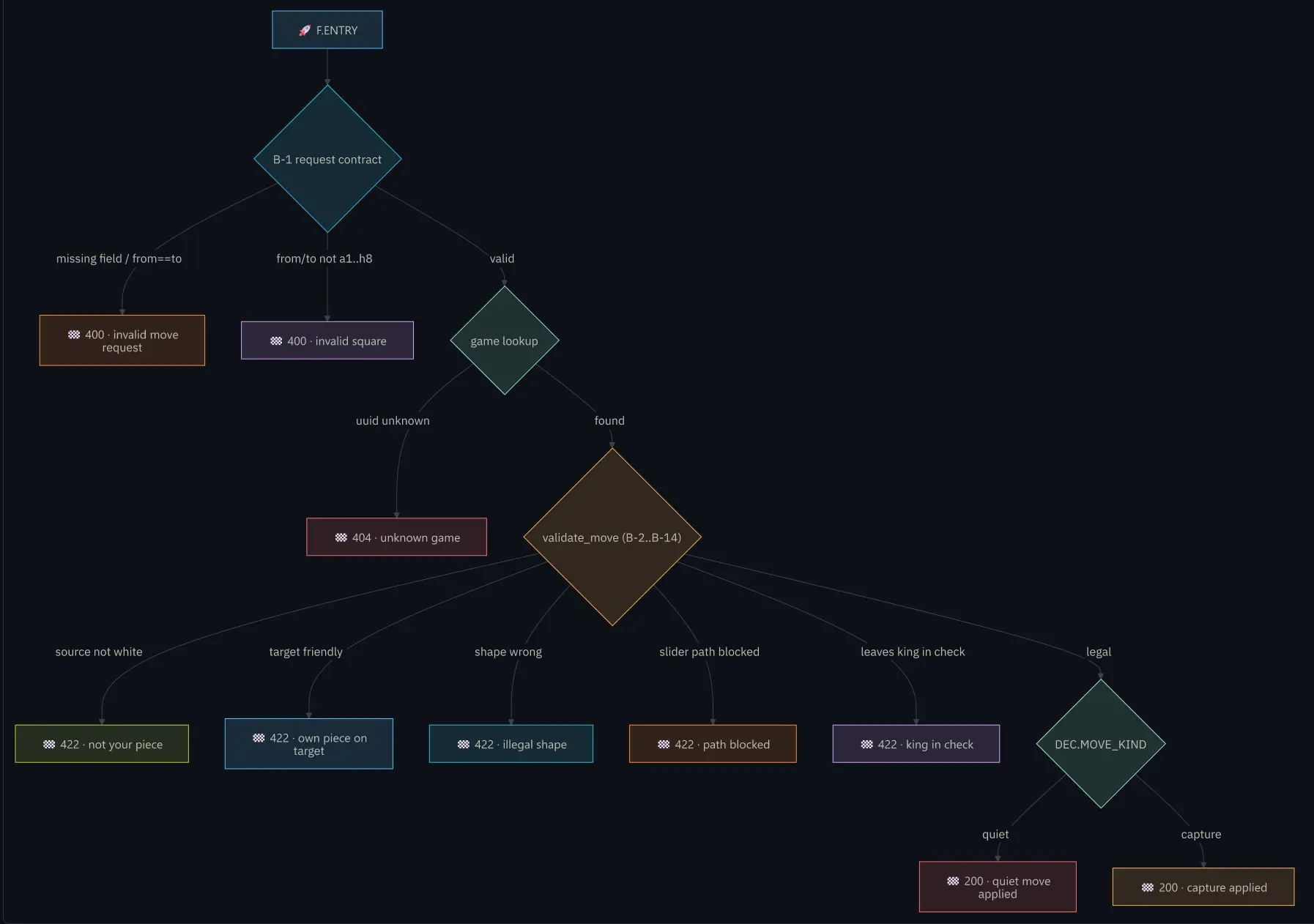
/move-a-piece request can take, read
straight from the code. F.ENTRY flows through the B-1 request contract and the
game lookup into validate_move (B-2..B-14) — the heart of the routine — which fans out to each
rejection (422 · not your piece, illegal shape, path blocked,
king in check, …) or, on a legal move, to DEC.MOVE_KIND splitting into a
200 · quiet move or a 200 · capture applied.The retrospective, on GitHub
The full retrospective — the proof-line tree and the validate_move chart — lives beside the
code in the feat/F0002-move-a-piece branch.
A log panel for the board
The front end already generates messages — illegal-move warnings, and info the API returns — but they weren't pretty. So we add a log panel: a responsive, styled history down the right side of the board, without touching the board itself.
Errors show in red, informational logs in
green. The list scrolls inside its own zone, bounded to
the board's height, so new entries never stretch the layout or push the board's a–h
coordinates off the edge — older entries simply scroll out of view.
F0002 — There's a message generated on the front end, and it isn't very
pretty. Keep the existing page as it is — don't change it radically,
especially the board — but add a responsive, nicely styled panel on the
right side that displays a log history.

Use red entries for errors (for now, the history of illegal-move messages)
and green entries for informational logs generated by the front end (which
may be populated from the JSON message returned by the API).

The log list must scroll within its own zone and stay bounded to the board's
height, so that as new entries come in the panel never stretches the layout
or pushes the board's a–h coordinates off its edge; older entries simply
scroll out of view.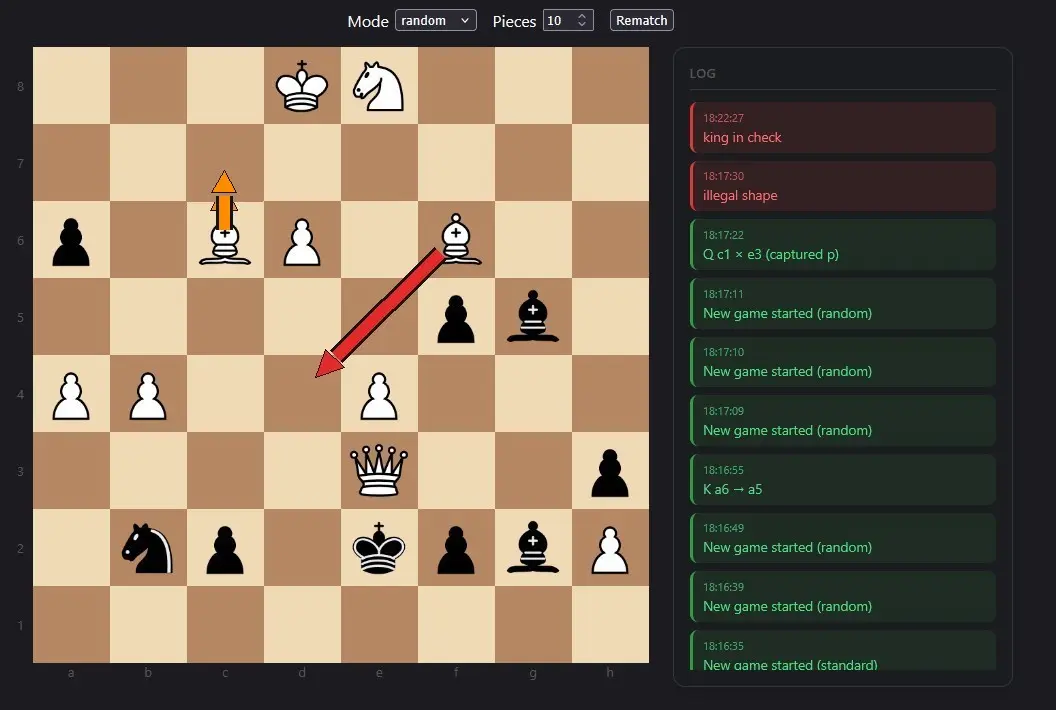
a–h coordinates while a
bounded, scrolling history sits to its right. Red
entries flag the two illegal moves — the C6→C7 bishop (illegal shape) and the F6→D4 bishop
(king in check), arrowed on the board — and green
entries carry the informational logs.
move-a-piece requested → move refused (illegal) — tagged with its
follower and closing on result="FAILURE": from=c6 to=c7 with
reason="illegal shape", and from=f6 to=d4 with reason="king in check".
The front-end panel above is just the friendly face of these lines.And here's the other side of the coin — a valid move. The bishop on C7 captures the black
pawn on D6: the source square is outlined in blue,
the target in red, and the panel records it as a
green entry — B c7 × d6 (captured p).
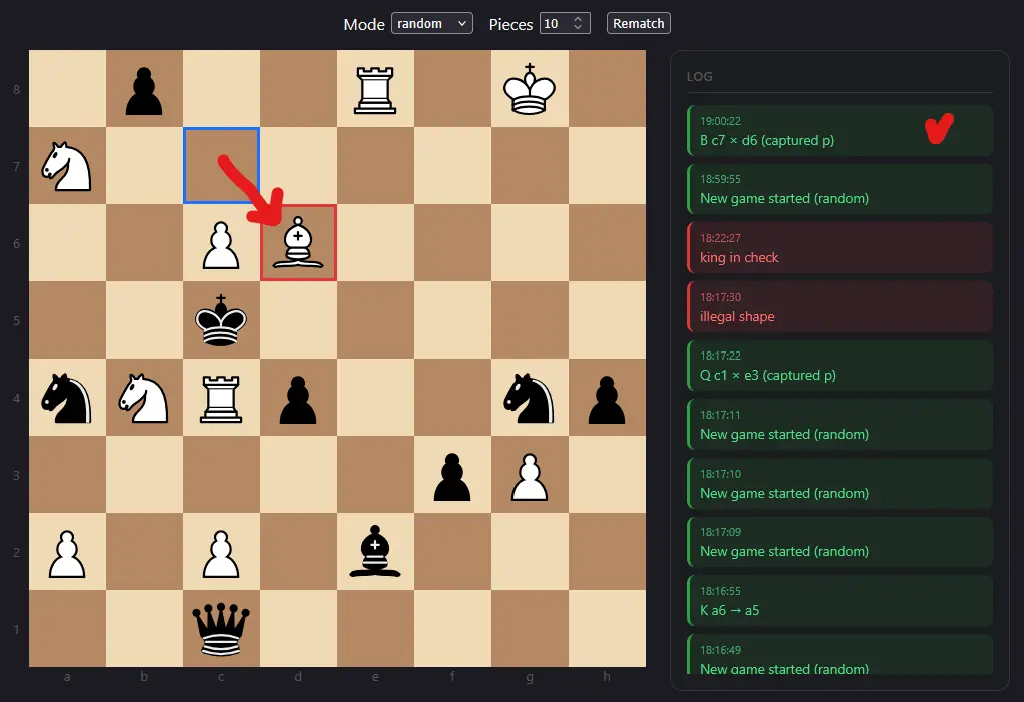
B c7 × d6 (captured p),
straight from the API's JSON response.
move-a-piece requested to move applied: legality validated
(legal=true), move_kind="capture" with capture=Some(BlackPawn), the
board updated and the take recorded (taken_count=1), closing on
result="SUCCESS".